对于许多用户而言,Windows 更新界面是既熟悉又独特的体验。当经典的蓝色背景与旋转的加载动画出现时,通常伴随着一段不可避免的等待时间。本文将介绍一个颇具巧思的网页项目,它将这一标志性的“更新”场景与音乐播放体验相融合,创造出一种新颖的互动方式。
项目构思:将“等待”转化为“沉浸”
系统更新过程中的视觉元素——特定的蓝色调、加载指示器以及进度百分比——已成为用户体验中不可或缺的一部分。与此同时,音乐作为一种普遍的媒介,通过旋律和歌词传递信息与情感。
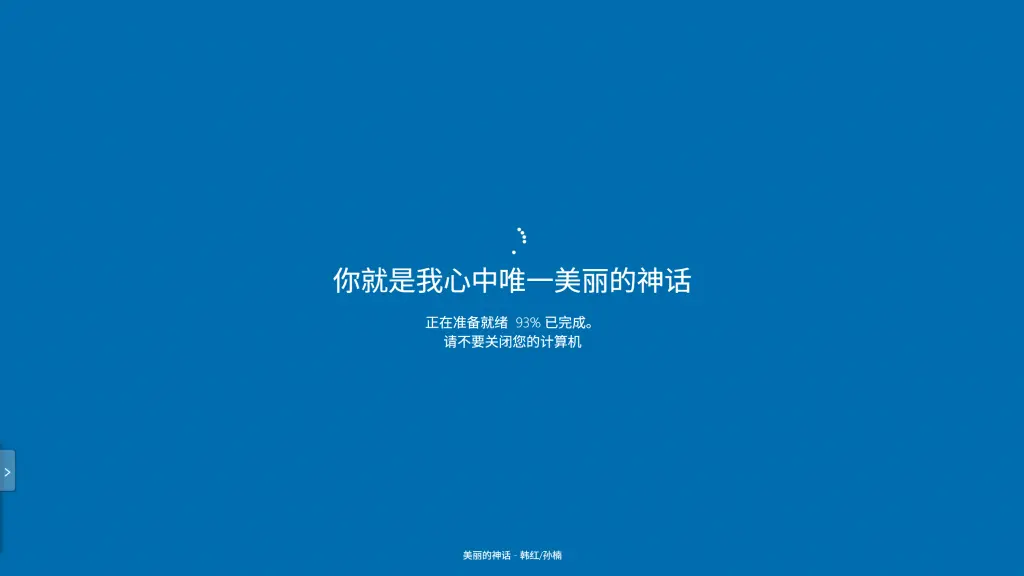
这个项目的核心概念在于:将音乐的听觉体验与系统更新的视觉框架相结合,实现一种跨界面的互动叙事。 当用户播放音乐时,歌词内容将化身为“更新状态”信息,而歌曲的播放进度则同步映射为“更新完成百分比”。这种设计旨在将原本可能被视为单调的等待时间,转变为一种独特且富有参与感的沉浸式体验。
功能亮点解析
这款概念性的网页播放器,在细节上力求还原“系统更新”的核心视觉特征,并将其与音乐播放功能无缝集成:
- 标志性的视觉界面:网页加载后,用户将看到熟悉的蓝色背景与加载动画,营造出一种仿佛置身于真实系统更新过程的氛围。
- 歌词作为核心信息流:当前播放的歌词将取代传统的系统提示(如“正在配置更新”、“请勿关闭计算机”),成为屏幕中央的主要动态信息。每一句歌词都如同更新过程中的一个关键节点,随音乐推进而变化。
- 播放进度与“更新百分比”同步:歌曲的实时播放进度被精确换算为更新完成的百分比。用户可以通过这个不断跳动的数字直观感受到音乐的进程,直至“更新完成”(即歌曲播放结束)。
- 歌曲元数据展示:为保证音乐体验的完整性,当前播放的歌曲名称与艺术家信息会清晰地显示在界面底部。
创意溯源与致谢
此项目的开发过程中,我们从现有的一些优秀设计与工具中汲取了灵感,并在此对相关贡献者表示感谢与敬意:
- 向 Lyricify 项目在新窗口中打开致敬:在歌词的动态展示与视觉效果方面,Lyricify 等创新的歌词软件为我们提供了宝贵的思路,启发我们探索歌词呈现的更多可能性。
- 感谢 FakeUpdate.net在新窗口中打开 提供的基础模板:本网页项目中“Windows 更新”界面的基础视觉框架与布局,借鉴并修改自 FakeUpdate.net在新窗口中打开 网站的 Windows 更新模拟器。我们对原始模板的作者表示感谢,其工作为本项目的二次创作提供了便利。
- 感谢Myhkw.cn在新窗口中打开提供的音乐播放器:本网页中的网页播放器来自myhkw.cn(明月浩空网)在新窗口中打开,音源,歌曲歌词都来自于此。
实现原理概述(用户视角)
用户与此网页交互时的基本流程如下:
- 网页初始化并加载一个预设的在线音乐播放器模块。
- 用户启动音乐播放后,网页前端脚本将实时监测并获取播放器输出的当前歌词、播放时间戳以及歌曲元数据(标题、艺术家)。
- 获取到的数据将被动态渲染到“Windows 更新”风格的界面相应位置:歌词在屏幕中央滚动,播放时间转换为百分比进度,歌曲信息则固定在底部显示。
整个过程旨在提供一种流畅且具有代入感的交互,让用户在熟悉的视觉框架下,以全新的方式体验音乐。
总结与展望
这个“Windows 更新样式歌词播放器”是一次将不同领域元素进行创新性融合的尝试。它探索了如何将日常的数字体验(如系统更新)与娱乐内容(如音乐播放)相结合,以产生出乎意料的互动效果。虽然它并非一个以生产力为导向的工具,但其独特的设计理念希望能为用户带来片刻的轻松与新奇感。
对于热衷于此类“跨界”创意的开发者或用户,不妨亲自体验并进一步挖掘其潜力。或许,正是这些看似“一本正经的趣味尝试”,能够为未来的数字交互设计带来更多灵感。
希望这个概念性的项目能引发您的兴趣。在这里去访问Win-Lyrics
获取/访问方式
- 网页端:
- Windows更新音乐播放:https://www.coren.xin/winlyrics
- Windows蓝屏音乐播放:https://www.coren.xin/winlyrics/bad
- Android端:
- Windows更新音乐播放:点击前往下载在新窗口中打开
- Windows蓝屏音乐播放:计划打包中...
- Windows:计划打包中...
源码公布
(代码版本--v1.2,欢迎进行二次创作添加更多功能并分享)本站采用 Creative Commons 署名-非商业性使用-相同方式共享 4.0 国际 (CC BY-NC-SA 4.0) 许可协议在新窗口中打开 进行许可。
<!DOCTYPE html>
<html>
<head>
<title>Win-Lyrics</title>
<!-- 代码版本--v1.2 -->
<link rel="icon" href="https://placehold.co/32x32/006DAE/FFFFFF?text=L" type="image/png">
<meta charset="UTF-8">
<meta name="robots" content="index, follow">
<meta name="googlebot" content="index, follow">
<!-- Viewport meta 标签对响应式设计至关重要。user-scalable=no 用于提供类似应用的感觉,但需考虑可访问性影响。 -->
<meta name="viewport" content="width=device-width, initial-scale=1.0, user-scalable=no">
<meta name="google" content="notranslate" />
<meta property="og:image:type" content="image/png">
<meta property="og:image:width" content="200">
<meta property="og:image:height" content="113">
<meta name="classification" content="Novelty">
<meta name="apple-mobile-web-app-capable" content="yes">
<script src="https://code.jquery.com/jquery-latest.js"></script>
<script>
// 用于从查询字符串设置背景颜色的原始脚本
window.onload = function() {
if (location.search && location.search.split('?')[1]) {
var myString = location.search.split('?')[1].replace(/%20/g, ' ');
$('body').css('background', "#" + myString);
}
// 注意:如果其他脚本也使用 window.onload,它们应该被链接或合并。
// 在此优化中,播放器初始化逻辑由 $(document).ready() 处理。
};
</script>
<SCRIPT TYPE="text/javascript">
// 禁用右键单击的原始脚本
var message = "Sorry, right-click has been disabled";
function clickIE() { if (document.all) { (message); return false; } }
function clickNS(e) { if (document.layers || (document.getElementById && !document.all)) { if (e.which == 2 || e.which == 3) { (message); return false; } } }
if (document.layers) { document.captureEvents(Event.MOUSEDOWN); document.onmousedown = clickNS; }
else { document.onmouseup = clickNS; document.oncontextmenu = clickIE; }
document.oncontextmenu = new Function("return false")
</SCRIPT>
<script>
// 按 Enter/Backspace 键跳转到蓝屏页面的原始脚本 (功能已被原作者注释掉)
$(function() {
$(document).keyup(function(e) {
switch (e.keyCode) {
case 13: /* open('bsod.html', '_self'); */ break;
case 8: /* open('bsod.html', '_self'); */ break;
}
});
});
</script>
<script>
// 原始谷歌分析代码
(function(i, s, o, g, r, a, m) {
i['GoogleAnalyticsObject'] = r; i[r] = i[r] || function() {
(i[r].q = i[r].q || []).push(arguments)
}, i[r].l = 1 * new Date(); a = s.createElement(o),
m = s.getElementsByTagName(o)[0]; a.async = 1; a.src = g; m.parentNode.insertBefore(a, m)
})(window, document, 'script', '//www.google-analytics.com/analytics.js', 'ga');
ga('create', 'UA-45751574-5', 'auto');
ga('send', 'pageview');
</script>
<style>
html {
width: 100%;
height: 100%;
margin: 0;
padding: 0;
/* 添加 touch-action 以防止在触摸设备上意外缩放/平移,支持 user-scalable=no */
touch-action: manipulation;
}
body {
background: #006dae; /* 默认的 Windows 蓝色 */
user-select: none; -moz-user-select: none; -webkit-user-select: none; -ms-user-select: none;
-webkit-background-size: cover; -moz-background-size: cover; -o-background-size: cover; background-size: cover;
margin: 0;
padding: 0;
font-family: 'Segoe UI Light', 'Segoe UI', Arial, sans-serif; /* 统一字体 */
color: #fff; /* 默认文本颜色 */
overflow: hidden; /* 防止出现滚动条,以实现类似应用的界面 */
width: 100%; /* 确保 body 占据 html 的全部宽度 */
height: 100%; /* 确保 body 占据 html 的全部高度 */
display: flex; /* 在 body 上使用 flex 来确保 .CT 始终居中,即使其高度小于 100% (尽管它被设置为 100%) */
align-items: center;
justify-content: center;
}
.CT { /* 主要内容容器 */
width: 100%; /* 占据 body 的全部宽度 */
max-width: 100vw; /* 确保它不超过视口宽度 */
height: 100%; /* 占据 body 的全部高度 */
max-height: 100vh; /* 确保它不超过视口高度 */
padding: 20px; /* .CT 内部内容的默认内边距 */
box-sizing: border-box; /* 内边距包含在宽度/高度计算中 */
display: flex;
flex-direction: column;
align-items: center;
justify-content: center;
font-size: 23px; /* CT 内内容的基础字体大小 */
font-weight: normal;
text-align: center; /* 确保加载动画、歌词等内容居中 */
}
.FONT { /* 文本元素容器 */
display: flex;
flex-direction: column; /* 垂直堆叠子元素 */
align-items: center; /* 水平居中子元素 */
justify-content: center;
width: 100%; /* 使 .FONT 使用 .CT 内边距内的可用宽度 */
/* max-width: 700px; /* 可选:如果需要在非常大的屏幕上限制文本块的宽度 */
}
.loader {
position: relative;
width: 50px; /* 原始宽度 */
height: 50px; /* 明确的高度以便更好地预测布局 */
margin-bottom: 5px; /* 已调整:减少加载动画下方的空间 */
}
.loader .circle {
position: absolute;
width: 48px;
height: 48px;
opacity: 0;
transform: rotate(225deg);
animation-iteration-count: infinite;
animation-name: orbit;
animation-duration: 5.5s;
}
.loader .circle:after {
content: '';
position: absolute;
width: 6px;
height: 6px;
border-radius: 5px;
background: #fff;
}
.loader .circle:nth-child(2) { animation-delay: 240ms; }
.loader .circle:nth-child(3) { animation-delay: 480ms; }
.loader .circle:nth-child(4) { animation-delay: 720ms; }
.loader .circle:nth-child(5) { animation-delay: 960ms; }
@keyframes orbit {
0% { transform: rotate(225deg); opacity: 1; animation-timing-function: ease-out; }
7% { transform: rotate(345deg); animation-timing-function: linear; }
30% { transform: rotate(455deg); animation-timing-function: ease-in-out; }
39% { transform: rotate(690deg); animation-timing-function: linear; }
70% { transform: rotate(815deg); opacity: 1; animation-timing-function: ease-out; }
75% { transform: rotate(945deg); animation-timing-function: ease-out; }
76% { transform: rotate(945deg); opacity: 0; }
100% { transform: rotate(945deg); opacity: 0; }
}
.update-status-text {
font-size: 1em; /* 相对于 .CT 的字体大小 (默认为 23px) */
line-height: 1.4;
}
#lyricsDisplay {
font-size: 2em; /* 相对于 .CT 的字体大小 (默认为 46px)。 */
margin-top: 10px;
margin-bottom: 25px;
line-height: 1.3;
font-weight: normal;
min-height: 1.3em; /* 最小高度以防止跳动,相对于其自身的字体大小 */
text-align: center;
word-break: break-word; /* 长单词/歌词换行以防止溢出 */
width: 100%; /* 确保它使用 .FONT 内的空间 */
overflow-wrap: break-word; /* word-break 的替代方案,以获得更广泛的兼容性 */
}
#songInfoDisplay {
position: fixed; /* 固定在底部 */
bottom: 20px;
left: 0; /* 确保它横跨整个宽度 */
width: 100%;
text-align: center;
color: white;
font-family: 'Segoe UI Light', 'Segoe UI', Arial, sans-serif;
font-size: 16px; /* 默认字体大小 */
padding: 5px 10px; /* 添加了水平内边距,以防文本接触边缘 */
z-index: 10;
box-sizing: border-box; /* 将内边距计算在宽度内 */
}
#myhkplayer_video {
/* 这可能是外部播放器的一部分,样式是 !important,所以如果需要覆盖会很困难 */
display: none !important;
}
/* 键盘操作通知的样式 */
.toast-notification {
position: fixed;
bottom: 80px; /* 定位在歌曲信息上方 */
left: 50%;
transform: translateX(-50%);
background-color: rgba(0, 0, 0, 0.6);
color: white;
padding: 8px 18px;
border-radius: 20px;
z-index: 1001; /* 在其他元素之上 */
opacity: 0;
transition: opacity 0.4s ease-in-out;
pointer-events: none; /* 这样它就不会阻挡点击事件 */
font-size: 14px;
white-space: nowrap;
}
.volume-bar-container {
position: fixed;
bottom: 80px;
left: 50%;
transform: translateX(-50%);
width: 180px;
background-color: rgba(0, 0, 0, 0.6);
padding: 8px 12px;
border-radius: 15px;
z-index: 1001;
opacity: 0;
transition: opacity 0.4s ease-in-out;
pointer-events: none;
color: white;
text-align: center;
}
.volume-bar-inner {
width: 100%;
height: 6px;
background-color: rgba(255, 255, 255, 0.3);
border-radius: 3px;
overflow: hidden; /* 确保填充部分保持在圆角内 */
}
.volume-bar-fill {
height: 100%;
background-color: white;
border-radius: 3px;
width: 50%; /* 默认值,将由 JS 设置 */
transition: width 0.1s linear;
}
#volume-level-text {
font-size: 13px;
margin-bottom: 6px;
}
/* 针对平板电脑和较小桌面屏幕的媒体查询 */
@media (max-width: 768px) {
.CT {
font-size: 21px; /* 稍微减小基础字体以更好地适应 */
}
#lyricsDisplay {
font-size: 1.9em; /* 调整歌词大小 */
margin-bottom: 20px;
}
}
/* 针对较大手机屏幕/小型平板电脑的媒体查询 */
@media (max-width: 600px) {
.CT {
padding: 15px; /* 调整内边距 */
font-size: 20px; /* 减小基础字体大小 */
}
#lyricsDisplay {
font-size: 1.8em; /* 调整歌词字体大小 */
margin-bottom: 20px; /* 调整外边距 */
}
.loader {
width: 45px; /* 稍小的加载动画 */
height: 45px;
margin-bottom: 5px; /* 已调整:减少加载动画的空间 */
}
.loader .circle { /* 缩放加载动画的圆圈 */
width: 43px;
height: 43px;
}
.loader .circle:after {
width: 5px;
height: 5px;
}
#songInfoDisplay {
font-size: 14px; /* 较小的歌曲信息文本 */
bottom: 10px;
padding: 5px 10px;
}
}
/* 针对较小手机屏幕的媒体查询 */
@media (max-width: 400px) {
.CT {
padding: 10px; /* 进一步减少内边距 */
font-size: 18px; /* 进一步减小基础字体大小 */
}
#lyricsDisplay {
font-size: 1.6em; /* 进一步调整歌词字体大小 */
margin-bottom: 15px; /* 进一步调整外边距 */
line-height: 1.25; /* 如果需要,可以稍微收紧行高 */
}
.update-status-text {
font-size: 0.9em; /* 调整状态文本大小 */
line-height: 1.3;
}
.loader {
width: 40px; /* 更小的加载动画 */
height: 40px;
margin-bottom: 5px; /* 已调整:减少加载动画的空间 */
}
.loader .circle { /* 缩放加载动画的圆圈 */
width: 38px;
height: 38px;
}
.loader .circle:after {
width: 4px;
height: 4px;
}
#songInfoDisplay {
font-size: 12px; /* 较小的歌曲信息文本 */
bottom: 5px;
padding: 3px 5px;
}
}
/* 针对非常窄的屏幕的媒体查询, 例如 iPhone SE 1st gen (320px 宽度) */
@media (max-width: 320px) {
.CT {
font-size: 16px;
}
#lyricsDisplay {
font-size: 1.5em;
}
.update-status-text {
font-size: 0.85em;
}
#songInfoDisplay {
font-size: 11px;
}
}
</style>
</head>
<body>
<div class="CT">
<div class="FONT">
<div class='loader'>
<div class='circle'></div>
<div class='circle'></div>
<div class='circle'></div>
<div class='circle'></div>
<div class='circle'></div>
</div>
<div id="lyricsDisplay">
(播放器初始化中...)
</div>
<div class="update-status-text">
<span id="ref" data-translate="_win10workingonupdates">正在准备就绪</span>
<span id="timer">0%</span> <span data-translate="_win7percent"> 已完成。</span><br />
<span data-translate="_win10donotturnoff">请不要关闭您的计算机</span>
</div>
</div>
</div>
<div id="songInfoDisplay">
歌曲信息加载中...
</div>
<!-- 用于键盘快捷键的通知元素 -->
<div id="toast-notification" class="toast-notification"></div>
<div id="volume-bar-container" class="volume-bar-container">
<div id="volume-level-text">音量: 50%</div>
<div class="volume-bar-inner">
<div id="volume-bar-fill" class="volume-bar-fill"></div>
</div>
</div>
<!-- 这个 video 元素是原始 HTML 的一部分。其样式(透明度、z-index、小尺寸、固定位置)表明它用于 myhkw.cn 播放器的后台音频处理或类似功能。它不应干扰视觉布局。 -->
<video mute loop style="z-index:-1;opacity:0.1;width:1px;height:1px;position:fixed;left:1px;bottom:1px;" aria-hidden="true">
</video>
<!--/****************************************************************/-->
<!--/* 注意:这是 myhkw.cn 音乐播放器 */-->
<!--/* 您可以替换此处的 key="" 为您自己的播放器ID */-->
<!--/* 或完全替换成其他播放器,但相关功能(如歌词、控制)需要自行开发 */-->
<!--/****************************************************************/-->
<script type="text/javascript" src="https://myhkw.cn/player/js/jquery.min.js"></script>
<script type="text/javascript" id="myhk" src="https://myhkw.cn/api/player/*************" key="**************" m="1"></script>
<script>
// 播放器集成和动态更新脚本
$(document).ready(function() {
var playerMonitorInterval;
var songInfoLoaded = false;
var initPlayerRetries = 0;
var MAX_INIT_RETRIES = 20; // 最大重试次数
var LYRIC_FETCH_RETRY_DELAY = 1500; // 重试延迟
// 关闭播放器自带的歌词显示
function turnOffPlayerInternalLyrics() {
var lyricSwitch = $('.switch-ksclrc');
if (lyricSwitch.length > 0) {
var icon = lyricSwitch.find('i');
if (icon.length && icon.hasClass('myhkicon-anniu_kaiqi')) {
console.log("播放器自带歌词显示为:开,尝试关闭...");
lyricSwitch.trigger('click');
} else {
console.log("播放器自带歌词显示为:关,或状态未知/无法确定。");
}
} else {
console.log("未找到播放器自带歌词的开关元素 (.switch-ksclrc)。");
}
}
// 绑定播放器事件
function bindPlayerEvents() {
if (typeof myhkaudio !== 'undefined' && myhkaudio) {
if (myhkaudio.eventsBound) return; // 防止重复绑定
myhkaudio.onplay = function() {
console.log("播放器事件: onplay");
if (!songInfoLoaded) updateSongArtistInfoOnce();
};
myhkaudio.onloadeddata = function() {
console.log("播放器事件: onloadeddata");
if (!songInfoLoaded) updateSongArtistInfoOnce();
};
myhkaudio.onpause = function() {
console.log("播放器事件: onpause");
};
myhkaudio.onended = function() {
console.log("播放器事件: onended");
$('#lyricsDisplay').text("(歌曲播放结束)");
$('#timer').text('100%');
songInfoLoaded = false;
};
myhkaudio.onemptied = function() {
console.log("播放器事件: onemptied (歌曲可能已更改或列表结束)");
songInfoLoaded = false;
$('#lyricsDisplay').text("(纯音乐,或等待下一曲)");
$('#songInfoDisplay').text("歌曲信息加载中...");
$('#timer').text('0%');
setTimeout(function() { // 稍后再次尝试更新信息
if (!songInfoLoaded) updateSongArtistInfoOnce();
}, 500);
};
myhkaudio.onerror = function(e) {
console.error("播放器事件: onerror", e);
$('#lyricsDisplay').text("(播放器错误)");
$('#songInfoDisplay').text("播放器错误");
};
myhkaudio.eventsBound = true;
console.log("播放器事件监听器已绑定。");
} else {
console.warn("尝试绑定事件监听器时 myhkaudio 未定义。");
}
}
// 初始化播放器集成
function initializePlayerIntegration() {
initPlayerRetries++;
// 检查播放器核心对象、歌词容器和歌曲信息元素是否都已加载
var playerReady = typeof myhkaudio !== 'undefined' && myhkaudio;
var lyricsContainerReady = typeof $ !== 'undefined' && $('#myhkLrc').length && $('#myhkLrc ul').length;
var songInfoElementsReady = $('div.myhkname span.myhksong span').length && $('span.myhkartist span').length;
if (playerReady && lyricsContainerReady && songInfoElementsReady) {
console.log("播放器, 歌词容器及歌曲/歌手信息元素已找到,开始动态更新。 (尝试次数: " + initPlayerRetries + ")");
if (playerMonitorInterval) {
clearInterval(playerMonitorInterval);
}
playerMonitorInterval = setInterval(updateDynamicPlayerInfo, 150); // 每 150ms 更新一次信息
updateSongArtistInfoOnce(); // 立即更新一次歌曲信息
setTimeout(turnOffPlayerInternalLyrics, 1000); // 1秒后尝试关闭自带歌词
bindPlayerEvents();
initPlayerRetries = 0; // 成功后重置计数器
} else {
if (initPlayerRetries < MAX_INIT_RETRIES) {
console.log("播放器相关元素尚未完全准备就绪,"+ (LYRIC_FETCH_RETRY_DELAY/1000) +"秒后重试... (尝试次数: " + initPlayerRetries + "/" + MAX_INIT_RETRIES + ")");
setTimeout(initializePlayerIntegration, LYRIC_FETCH_RETRY_DELAY);
} else {
console.error("已达到最大初始化尝试次数 ("+ MAX_INIT_RETRIES +"),播放器未能成功初始化。请检查播放器脚本和DOM结构。");
$('#lyricsDisplay').text("(播放器初始化失败)");
$('#songInfoDisplay').text("播放器初始化失败");
if (playerMonitorInterval) clearInterval(playerMonitorInterval);
}
}
}
// 动态更新播放信息(歌词和进度)
function updateDynamicPlayerInfo() {
if (typeof myhkaudio === 'undefined' || !myhkaudio) {
return; // 如果播放器对象不存在则退出
}
var currentLyricLine = $('#myhkLrc li.myhknow'); // 获取当前高亮的歌词行
var lyricTextToShow = "";
if (currentLyricLine.length > 0) {
lyricTextToShow = currentLyricLine.text().trim();
} else if (myhkaudio.src && myhkaudio.paused && myhkaudio.currentTime === 0 && !myhkaudio.ended) {
// 歌曲已加载但未播放时,尝试显示第一句有效歌词
var firstAvailableLyric = $('#myhkLrc li').filter(function() {
return $(this).text().trim() !== '';
}).first();
if(firstAvailableLyric.length > 0){
lyricTextToShow = firstAvailableLyric.text().trim();
} else {
if (myhkaudio.duration > 0 && !$('#myhkLrc li').length) {
lyricTextToShow = "(纯音乐,或歌词无法获取)";
} else {
lyricTextToShow = "(歌词加载中...)";
}
}
} else if (!myhkaudio.src && !myhkaudio.currentSrc) {
lyricTextToShow = "(请选择或播放歌曲)";
} else if (myhkaudio.ended) {
lyricTextToShow = "(歌曲播放结束)";
}
else if (myhkaudio.src && !myhkaudio.paused && lyricTextToShow === "" && $('#lyricsDisplay').text() !== "...") {
// 播放中但没有歌词(例如间奏),显示 ...
lyricTextToShow = "...";
}
// 仅当歌词文本变化时才更新 DOM,避免不必要的重绘
if (lyricTextToShow && $('#lyricsDisplay').text() !== lyricTextToShow) {
$('#lyricsDisplay').text(lyricTextToShow);
} else if (!lyricTextToShow && myhkaudio.src && !myhkaudio.paused && $('#lyricsDisplay').text() !== "...") {
$('#lyricsDisplay').text("...");
}
// 更新播放进度百分比
if (myhkaudio.duration && myhkaudio.duration > 0 && isFinite(myhkaudio.duration)) {
var currentTime = myhkaudio.currentTime;
var duration = myhkaudio.duration;
var percentage = (currentTime / duration) * 100;
$('#timer').text(Math.min(100, Math.floor(percentage)) + '%');
} else if (myhkaudio.ended) {
$('#timer').text('100%');
}
else {
$('#timer').text('0%');
}
}
// 更新一次歌曲和艺术家信息
function updateSongArtistInfoOnce() {
// 如果信息已加载且内容有效,则不再执行
if (songInfoLoaded && !$('#songInfoDisplay').text().includes("加载中") && !$('#songInfoDisplay').text().includes("等待播放器")) return;
if (typeof myhkaudio !== 'undefined' && myhkaudio) {
var title = null;
var artist = null;
var songTitleElement = $('div.myhkname span.myhksong span').first();
if (songTitleElement.length > 0 && songTitleElement.text().trim() !== '') {
title = songTitleElement.text().trim();
}
var artistElement = $('span.myhkartist span').first();
if (artistElement.length > 0 && artistElement.text().trim() !== '') {
artist = artistElement.text().trim();
}
if (title && artist) {
$('#songInfoDisplay').text(title + " - " + artist);
songInfoLoaded = true;
console.log("歌曲信息已成功加载: " + title + " - " + artist);
} else if (title) {
$('#songInfoDisplay').text(title);
songInfoLoaded = true;
console.log("歌曲标题已成功加载: " + title + " (艺术家未知)");
} else {
if ($('#songInfoDisplay').text().includes("加载中") || $('#songInfoDisplay').text().includes("等待播放器") || songInfoLoaded === false) {
if ($('#songInfoDisplay').text().includes("等待播放器")) {
$('#songInfoDisplay').text("歌曲信息加载中...");
}
}
}
}
}
// 初始状态显示
$('#lyricsDisplay').text("(正在初始化...)");
$('#songInfoDisplay').text("等待播放器加载...");
// 开始集成流程
initializePlayerIntegration();
});
</script>
<!-- 更新:键盘和触摸控制脚本 -->
<script>
$(document).ready(function() {
// 在设置控件之前检查播放器对象是否存在
if (typeof myhkaudio === 'undefined') {
console.error("快捷键错误:未能找到播放器对象 (myhkaudio)。");
return;
}
let toastTimer;
let volumeBarTimer;
// 显示文本通知的函数
function showToast(message) {
const toast = $('#toast-notification');
clearTimeout(toastTimer); // 清除上一个计时器
$('#volume-bar-container').css('opacity', 0); // 隐藏音量条
toast.text(message).css('opacity', 1);
toastTimer = setTimeout(() => {
toast.css('opacity', 0);
}, 1200);
}
// 显示音量条通知的函数
function showVolumeBar() {
const volumeBarContainer = $('#volume-bar-container');
const volumeFill = $('#volume-bar-fill');
const volumeText = $('#volume-level-text');
clearTimeout(volumeBarTimer); // 清除上一个计时器
$('#toast-notification').css('opacity', 0); // 隐藏文本通知
const currentVolume = Math.round(myhkaudio.volume * 100);
volumeText.text(`音量: ${currentVolume}%`);
volumeFill.css('width', `${currentVolume}%`);
volumeBarContainer.css('opacity', 1);
volumeBarTimer = setTimeout(() => {
volumeBarContainer.css('opacity', 0);
}, 1500);
}
// --- 键盘控制 ---
$(document).on('keydown', function(e) {
if (typeof myhkaudio === 'undefined') return;
switch (e.key) {
case ' ': // 空格键:播放/暂停
e.preventDefault();
if (myhkaudio.paused) {
myhkaudio.play();
showToast('播放');
} else {
myhkaudio.pause();
showToast('暂停');
}
break;
case 'ArrowRight': // 右箭头:下一首
e.preventDefault();
if ($('.myhknext').length) {
$('.myhknext').trigger('click');
showToast('下一首');
}
break;
case 'ArrowLeft': // 左箭头:上一首
e.preventDefault();
if ($('.myhkprev').length) {
$('.myhkprev').trigger('click');
showToast('上一首');
}
break;
case 'ArrowUp': // 上箭头:音量增加
e.preventDefault();
let newVolumeUp = Math.min(myhkaudio.volume + 0.01, 1.0);
myhkaudio.volume = newVolumeUp;
showVolumeBar();
break;
case 'ArrowDown': // 下箭头:音量减小
e.preventDefault();
let newVolumeDown = Math.max(myhkaudio.volume - 0.01, 0.0);
myhkaudio.volume = newVolumeDown;
showVolumeBar();
break;
}
});
// --- 触摸控制 ---
let touchStartX = 0;
let touchStartY = 0;
let touchEndTime = 0;
let touchStartTime = 0;
// 将触摸事件绑定到主内容区域
$('.CT').on('touchstart', function(e) {
touchStartX = e.originalEvent.touches[0].clientX;
touchStartY = e.originalEvent.touches[0].clientY;
touchStartTime = new Date().getTime();
});
$('.CT').on('touchend', function(e) {
if (typeof myhkaudio === 'undefined') return;
const touchEndX = e.originalEvent.changedTouches[0].clientX;
const touchEndY = e.originalEvent.changedTouches[0].clientY;
touchEndTime = new Date().getTime();
const deltaX = touchEndX - touchStartX;
const deltaY = touchEndY - touchStartY;
const deltaTime = touchEndTime - touchStartTime;
// 用于区分点击和滑动的阈值
const minSwipeDist = 50; // 最小滑动距离 (像素)
const maxTapDist = 10; // 最大点击距离 (像素)
const maxTapTime = 250; // 最大点击时间 (毫秒)
// 检查是否为点击操作
if (deltaTime < maxTapTime && Math.abs(deltaX) < maxTapDist && Math.abs(deltaY) < maxTapDist) {
if (myhkaudio.paused) {
myhkaudio.play();
showToast('播放');
} else {
myhkaudio.pause();
showToast('暂停');
}
return; // 停止进一步处理
}
// 检查是否为滑动操作 (如果不是点击)
if (Math.abs(deltaX) > Math.abs(deltaY)) { // 水平滑动
if (Math.abs(deltaX) > minSwipeDist) {
if (deltaX < 0) {
// 向左滑动 -> 下一首
if ($('.myhknext').length) {
$('.myhknext').trigger('click');
showToast('下一首');
}
} else {
// 向右滑动 -> 上一首
if ($('.myhkprev').length) {
$('.myhkprev').trigger('click');
showToast('上一首');
}
}
}
} else { // 垂直滑动
if (Math.abs(deltaY) > minSwipeDist) {
if (deltaY < 0) {
// 向上滑动 -> 音量增加 (增加 5% 以获得明显变化)
let newVolumeUp = Math.min(myhkaudio.volume + 0.05, 1.0);
myhkaudio.volume = newVolumeUp;
showVolumeBar();
} else {
// 向下滑动 -> 音量减小 (减少 5%)
let newVolumeDown = Math.max(myhkaudio.volume - 0.05, 0.0);
myhkaudio.volume = newVolumeDown;
showVolumeBar();
}
}
}
});
});
</script>
</body>
</html>
更新日志
版本 v1.0 - 核心功能 & 快捷键支持
- 【新功能】 首次引入了完整的键盘快捷键支持,您现在可以通过键盘方便地控制播放器:
- 空格键: 播放 / 暂停
- →: 下一首
- ←: 上一首
- ↑: 音量提高
- ↓: 音量降低
- 【新功能】 添加了操作反馈系统。当您使用快捷键时,页面底部会显示一个半透明的、非侵入式的提示(如“播放”、“暂停”、音量条等),并在短暂显示后自动消失。
版本 v1.1 - 功能优化 & 错误修复
- 【修复】 解决了通过键盘快捷键 (←/→) 无法切换上一首/下一首歌曲的问题。
- 【优化】 将键盘快捷键 (↑/↓) 的音量调节步进从
10%修改为1%,以满足更精细化的音量控制需求。
版本 v1.2 - 移动端体验升级 & 手势操作
- 【新功能】 为了提升触摸屏用户的交互体验,现已全面支持手势操作:
- 单击屏幕: 播放 / 暂停音乐。
- 向左滑动: 切换至下一首歌曲。
- 向右滑动: 切换至上一首歌曲。
- 向上滑动: 提高音量。
- 向下滑动: 降低音量。
- 【优化】 所有手势操作均配备了与键盘快捷键一致的视觉反馈提示,确保了不同操作方式下的体验统一性。
版本v1.3
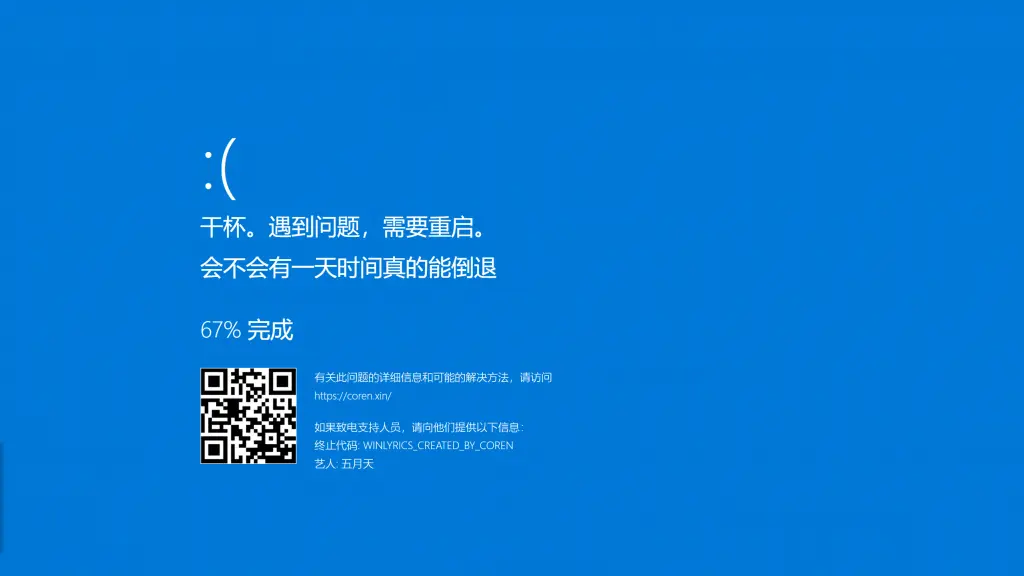
- 【新功能】增加Windows蓝屏音乐播放界面https://www.coren.xin/winlyrics/bad
- 【优化】更加沉浸式的播放界面,隐藏myhkw播放器的折叠窗为深色阴影长条
- 【新功能预览图】:
版本v1.5
- 【新功能】所有播放器引入支持视频Windows系统媒体控制(SMTC)协议,网页在播放音乐时,能够像原生应用一样与 Windows 系统进行交互,在音量浮窗、锁屏界面等位置显示歌曲信息、封面和播放控件。
- 【优化】优化蓝屏播放器(BSDO-lyrics)的界面显示,更加贴合原生Windows蓝屏界面
感谢您的使用与反馈,我们将持续优化您的播放体验!
对该网页内容有疑惑?/Have questions about the content of this page?
请参考本站的《免责声明》和《隐私政策》,如果您认为涉及侵权等事宜,请联系Coren,本站将在核实后24小时内关闭并删除相关内容。
Please refer to the 'Disclaimer' and 'Privacy Policy' of this site. If you think it involves infringement or other issues, please contact Coren. This site will close and delete the relevant content within 24 hours after verification.
[本文由Gemini自动生成]



参与讨论